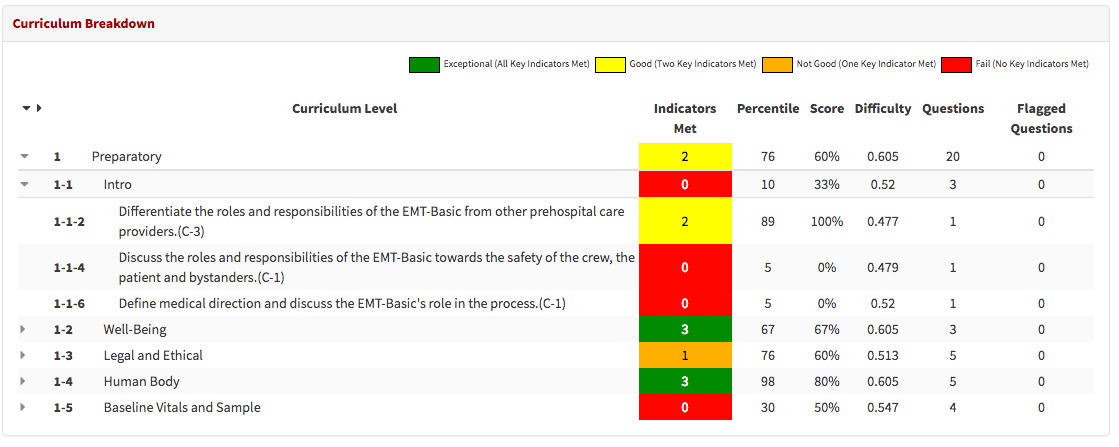
The Adaptive Results page allows students to review a visual representation of their key indicators, presented as numerical values reflecting their performance on their computer-adaptive tests. Allowing them to better understand where they can improve their knowledge and their proficiency.
Understanding Adaptive Test Results:
Contents:
A. Summative Results:
This is a general overview of how you did on this particular adaptive test.

Summary:
This will be an overall result based on whether you met the key indicators for Percentile Ranking, Average Score, and Highest Difficulty on this test as a whole, not the chart breakdown below. The 4 possible Summary results are: Fail, Not Good, Good, and Exceptional.
- Fail: This means you were unable to surpass any of the benchmarks
- Not Good: This means you were able to surpass one of the benchmarks
- Good: This means you were able to surpass two of the benchmarks
- Exceptional: This means you were able to surpass all three of the benchmarks
Achieving The Benchmark For Percentile Ranking:
Percentile: This number shows in what percentile you rank. It compares how you did on this test against all other students testing at this provider level.
Achieving The Benchmark For Average Score:
Questions Asked: The total number of questions you were asked on this test
Correct Answers: The total number of questions you were asked on this test that you answered correctly
% Correct: Total Percentage of correct answers out of the questions asked.
Achieving the Benchmark for Highest Difficulty:
To achieve the highest difficulty benchmark, you must be exposed to a question above a .60 in difficulty during their test experience. This can be confirmed by reviewing the Difficulty in Cirriulum Breakdown section.
B. Charts:
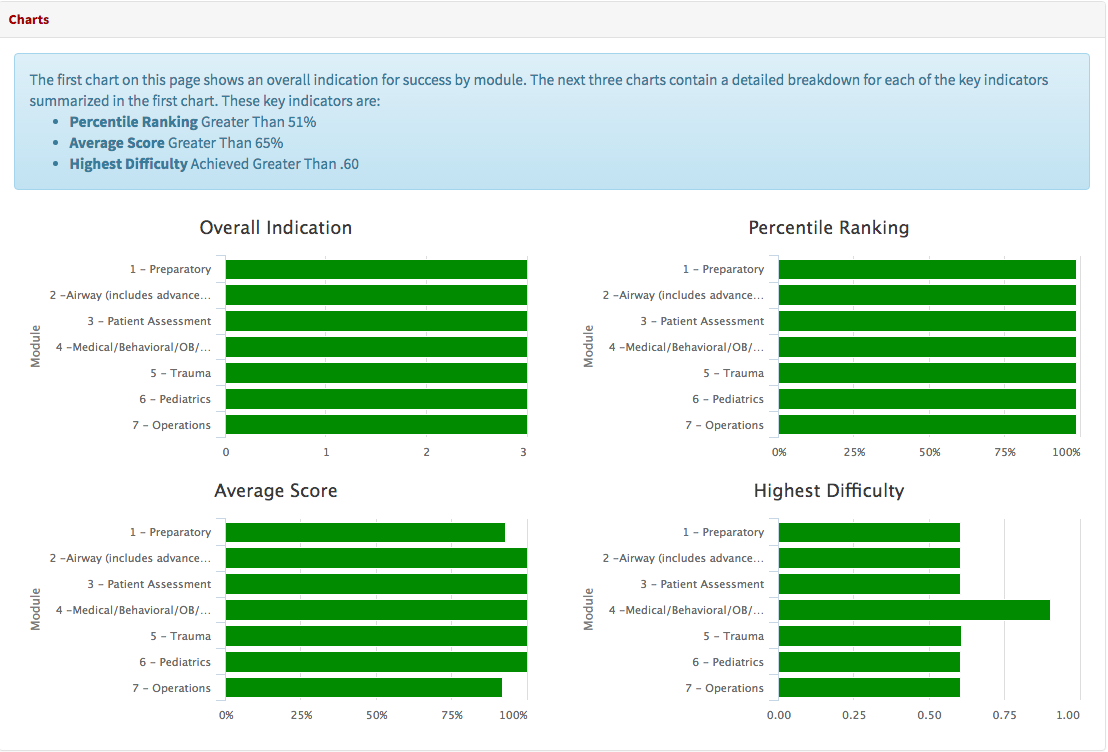
The charts provide additional information on test performance by applying the Percentile Ranking, Average Score, and Highest Difficulty criteria to the individual modules in the test to allow for further analysis of understanding of the material.
Overall Indication:
The first chart on this page shows an overall indication for success by module. The Ranks of Fail, Not Good, Good, and Exceptional are based on surpassing the benchmark on 3 criteria: Percentile Ranking, Average Score, and Highest Difficulty.
- Fail: This means you were unable to surpass any of the benchmarks.
- Not Good: This means you surpassed one of the benchmarks.
- Good: This means you surpassed two of the benchmarks.
- Exceptional: This means you surpassed all three of the benchmarks.
Note: To qualify for Testing's First Time Pass Guarantee, students need to achieve a score of at least 2 Exceptional and the remaining scores Good on a timed, comprehensive, computer-adaptive test covering all the categories offered by Platinum Educational Group.
- Info: For more information on our First Time Pass Guarantee, click here to visit our Promises page.
Percentile Ranking:
This percentage represents where you are positioned within the schools in our system.
- Example: An overall percentile of 67 in a module means you are in the top third of the system’s test takers testing at that provider level in the module selected.
For the benchmark, you would want to test above the 51st percentile.
Average Score:
This is the percentage of questions you answered correctly in a given module.
For the benchmark, you would want to be getting more than 65% of questions correct in a module
Highest Difficulty:
This describes the most difficult question you were exposed to during testing for a given module, even if it was not answered correctly. Since in an adaptive test, the more questions you answer correctly the harder the questions are that you are presented with, even being asked a question at a high difficulty level is an accomplishment. A question with a difficulty of 0.0 would be one that no one ever misses and a difficulty of 0.96 would be an item that hardly anyone ever gets correct. For a benchmark, you will want to be asked a question with a difficulty above .60
C. Curriculum Breakdown:
This can be very helpful when trying to isolate specific areas that may require more study. To expand a module, select the triangle button immediately to its left. This shows you the topics associated with the module you answered questions on. If testing in the Module, Topic, Objective (MTO) curriculum, you can expand the topics even further into individual objectives.